
Which AI Models Have the Largest Context Windows in 2026?
- What Is a Large Context Window for AI Models?
- Top 15 Largest Context Window AI Models 2026 (LLMs)
- How to Use AI Models with the Largest Context Window?
- Is a Larger Context Window AI Model Always Better
Context window size is a critical consideration when selecting an AI model for task automation, particularly for workflows that process large volumes of information. Many users want to know which are the largest context window AI models in 2026, and how to select the best fit for their use cases. That’s what we’ll dive into on this page.
What Is a Large Context Window for AI Models?
A large context window sets the maximum amount of information an LLM can ingest and reference in a chat. Measured in tokens, it handles high-volume content like full books, lengthy contracts, complete research papers, or hours of transcripts in one go, no chunking needed.
As of October 30, 2026, many AI models offer exceptionally large context windows. Below, we've rounded up some of the top contenders.
Top 15 Largest Context Window AI Models 2026 (LLMs)
1. Llama 4 Scout (Meta) — 10M tokens
Open-weight model with the largest published context window to date. It suits private, offline work on huge documents and code bases.
2. Grok 4.20 (xAI) — 2M tokens
Closed-weight reasoning model with tool use and image input. You get the full 2M window only through the API, not the web chat.
3. GPT-6 Astra (OpenAI) — 1.05M tokens
OpenAI’s most capable model, built for the hardest end-to-end work. Requests above 272K tokens cost more.
4. GPT-6.1 Sol (OpenAI) — 1.05M tokens
Newer GPT-6 model with the same 1.05M window and 128K max output.
5. GPT-6 Luna (OpenAI) — 1.05M tokens
A fast, low-cost model for high-volume work. Good for bulk reading and extraction.
6. Gemini 4 Argon (Google) — 1,048,576 tokens
Google’s newest flagship model that uses a shared token budget for both input and output. Longer responses therefore consume more of the allowance, leaving less space for your incoming context.
7. Gemini 3.8 Flash (Google) — 1,048,576 tokens
Google’s fast, versatile workhorse with a 1M-token shared context budget, built for coding, agents, and long-document reasoning.
8. Kimi K3 (Moonshot AI) — 1,048,576 tokens
An open, natively multimodal flagship, built for long-horizon coding, deep research, and complex agentic reasoning.
9. Muse Spark 1.1 (Meta) — 1,048,576 tokens
Closed model that handles text, image, video, audio, and PDF input and manages its own context. It launched as a US-only developer preview.
10. GLM-5.3 (Z.ai) — 1,048,576 tokens
Open-weight model for text, with always-on reasoning and 128K max output. Aimed at coding and agent tasks.
11. Qwen3.8-2.4T-A95B (Alibaba) — 1.01M tokens (extended)
Open-weight model whose native window is 262K, extendable to about 1.01M. You need to enable the extension to reach the full length.
12. Claude Opus 5.5 (Anthropic) — 1M tokens
Has 128K max output. The full window costs the same per token, with no long-prompt surcharge.
13. Claude Fable 5.1 (Anthropic) — 1M tokens
Anthropic’s pick for demanding reasoning and long-running agent work.
14. DeepSeek-V4-Pro (DeepSeek) — 1M tokens
Open-weight (MIT license) with an unusually large 384K max output.
15. Solar Open2 250B (Upstage) — 1M tokens
Open-weight, text-only model that activates only 15B of its 250B parameters per token.
How to Use AI Models with the Largest Context Window?
There are 3 popular ways to use large AI models based on your skills, preferences, as well as operation environments.
Method 1. Use a Chat Assistant in a Web Browser or App
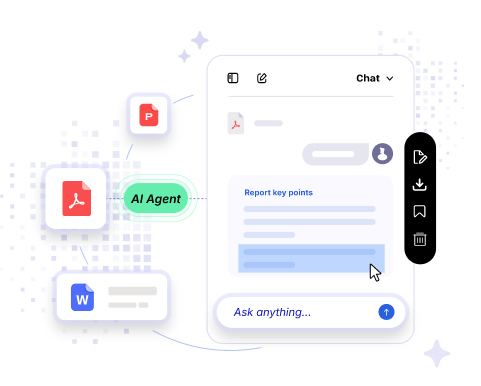
For quick and easy access, use a web-based chat assistant like Gemini or a desktop app like iBoomto AI. Simply choose an LLM with a large context window that your hardware can support, enter your prompt, and refine the results through follow-up messages. There is no complicated required.

 Free Download Now
Method 2. Use a Coding or Developer Assistant
If you're an experienced user or developer, you can integrate an AI assistant into your code editor or terminal. Tools like GitHub Copilot, Cursor, and Claude Code let you write, debug, and explain code directly within your development environment, helping you work with large codebases more efficiently.
Method 3. Run Large-Context LLMs in a Self-Hosted Environment
For greater customization and control, you can deploy an open-source LLM with a large context window in your own space. The likes of Ollama, LM Studio, and vLLM make it easier to run and manage models locally or on your own server so that you can customize model configurations, inference settings, and integrations to suit your needs.
Is a Larger Context Window AI Model Always Better
A larger context window doesn't always guarantee better information retrieval. Even with a massive window, a model may still overlook important details buried deep in lengthy inputs. Meanwhile, larger context windows demand more computing resources, potentially slowing down your PC and requiring higher hardware specifications and a bigger budget. It's best to carefully weigh these trade-offs against your actual needs, hardware capabilities, and usage environment.
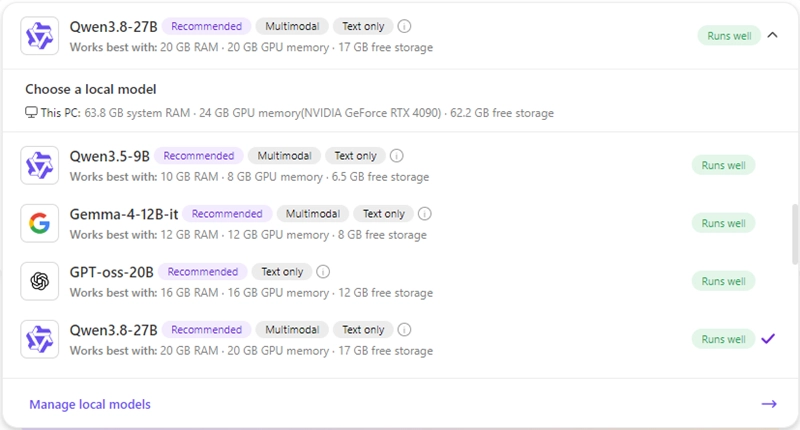
Is there a way to deal with lengthy files with less investment? Yes, Qwen 3.8 27B, Qwen3-VL-32B, and Gemma 4 26B all offer large context windows of roughly 256K to 262K tokens. That is enough for you to handle most long documents in daily life. As mentioned earlier, iBoomto brings these models together in one desktop app, so you can process documents without extra setup.
New models are released all the time, so the largest context window AI models keep changing. Bookmark this page to keep up with the latest updates.
Was this helpful?
Thank you for your feedback!